The Best Options Calculator Toolsuite for Any Strategy
Unlock your true potential in options trading because this toolsuite helps to...
Take real control over ANY strategies and manage trades, money and time like never before
Analyze any option strategy, learn details of greeks, effects on time, in volatility, save your trades to keep track of everything and compare different option strategies one to one in the same graph.
And mark the difference when trading options!
All Warsoption Toolsuite Features In 3 Minutes
Even though options trading is proven to be very profitable, it is clear that going blindly and not having the right tools to analyze the strategies means that we can lose control of the trade and therefore, our money.
If you are just beginning...
You may have already noticed that even simple strategies such as buying calls or puts are not so easy to understand and this makes you lose money and gain frustration.
Although you have considered using strategies with several legs, you have not been able to do it because understanding them is a challenge since they depend on too many variables... and it is clear that understanding this at the beginning is not an easy task.
If you have experience…
You know how complex strategies work and how time, volatility, and the underlying affect the trade...
But you also know that as you add more legs, the strategy gets more complicated, and its behavior varies dramatically. And keeping track of each branch separately is challenging, but keeping track of the entire strategy is even more difficult.
If you are an expert…
You know how fast the market changes and many times, this forces you to modify the previous analysis, making you lose the ability to react, resulting in worse entries and lower profits...
Besides, how much time do you usually waste on average recording your trades in a journal? It is not the first time that you leave it for later, and in the end, you end up recording the operation several days later, losing part of key information.
With Warsoption Toolsuite you will be able to analyze, simulate, trade, compare and register your options strategies while maintaining full control in a fast, efficient and adaptable way.
If you have just started with options
You have to learn how the strategies work and how the different variables affect them, and the best way is to have a option calculator that allows you to experiment without risk and learn quickly and visually.
If you have already experience
You will be able to generate any options strategy and compare which is suitable for you while analyzing its key points, always keeping full control over prices and potential profits and losses or any other detail, no matter how complex the strategy is.
If you are an expert option trader
What you need is to gain precision and speed, thus improving your entries and exits because you will be able to change the strategy analysis instantly and save a lot of time when recording your trades with just a single click on a button.
The Main Features of Warsoption Toolsuite
The Advanced Calculator Module
The core module of Warsoption Toolsuite will allow you to create, design, analyze and visually identify the behaviour for any option strategy that you want. It includes interactive pointers to learn the performance of the strategy at a certain underlying value of your choice to check the behavior of the P/L graph and the Greeks Graph.
It is not just a simple option profit calculator, it is a very advanced module that will also allows you perform different adjustments of your strategies, simulate exits of different legs in any scenario you wish and learn all the possible alternatives in the trade.
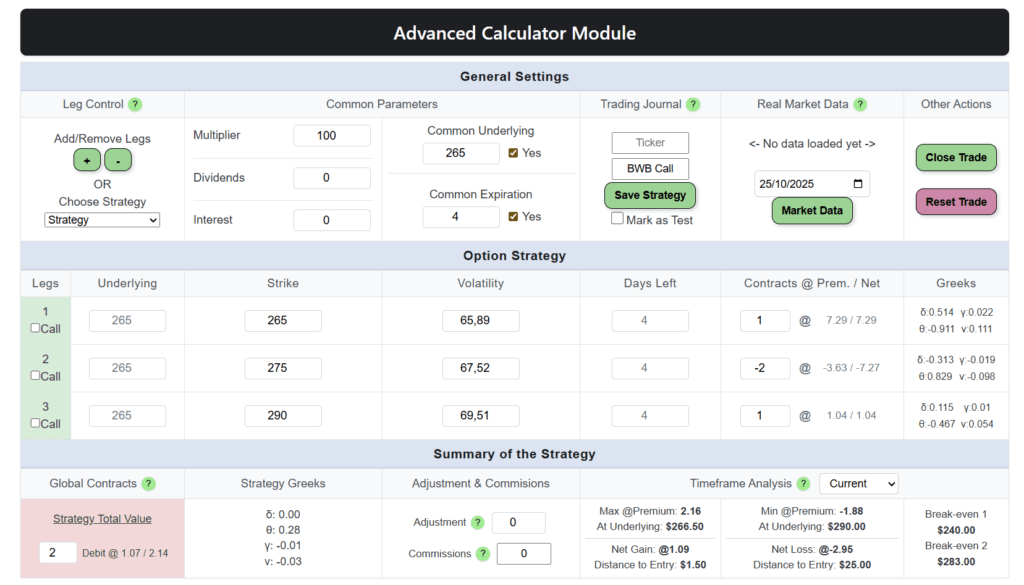
This is the main panel for the Advanced Calculator Module in which you can create any option strategy that you wish
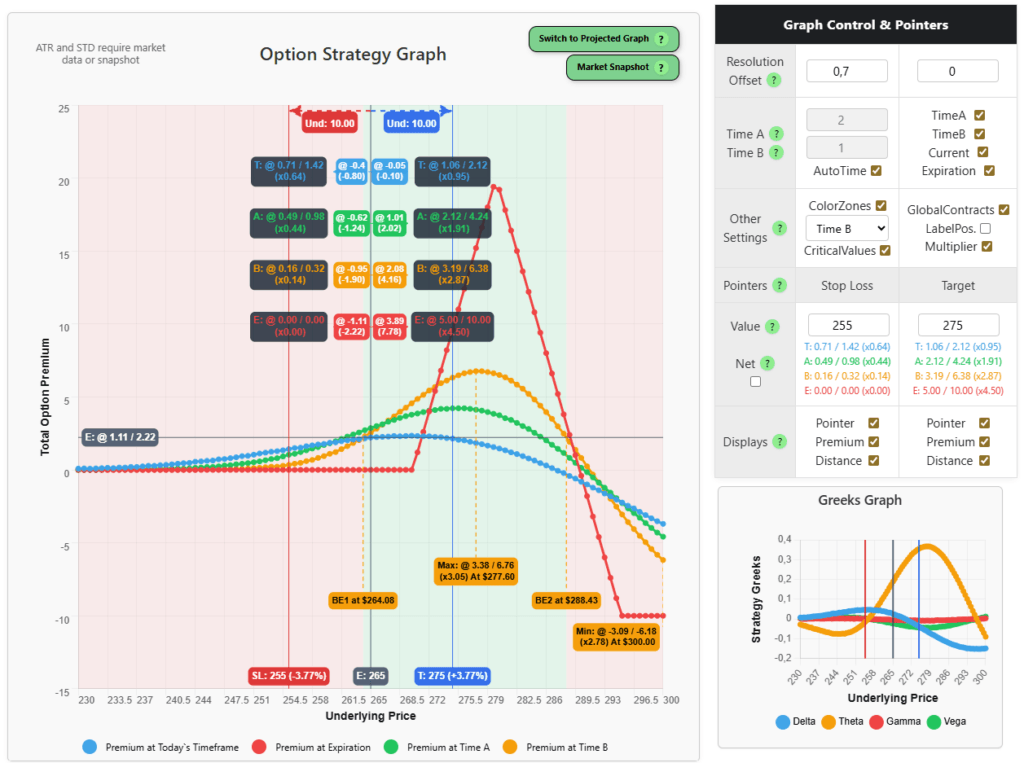
And this is the graph for the option calculator profit and loss and the greeks graph for the strategy selected
Our advanced option calculator does not only use theoretical parameters, it can be easily configured to retrieve real time data for the option chains without any delay so we can keep up with the market!
And the best part? We are focused on speed and ease of use, so any change in any of the parameters will automatically update the strategy on the fly. No more waits and no more friction!
One of the most powerful features is the ability to project your strategy directly onto the underlying price chart.
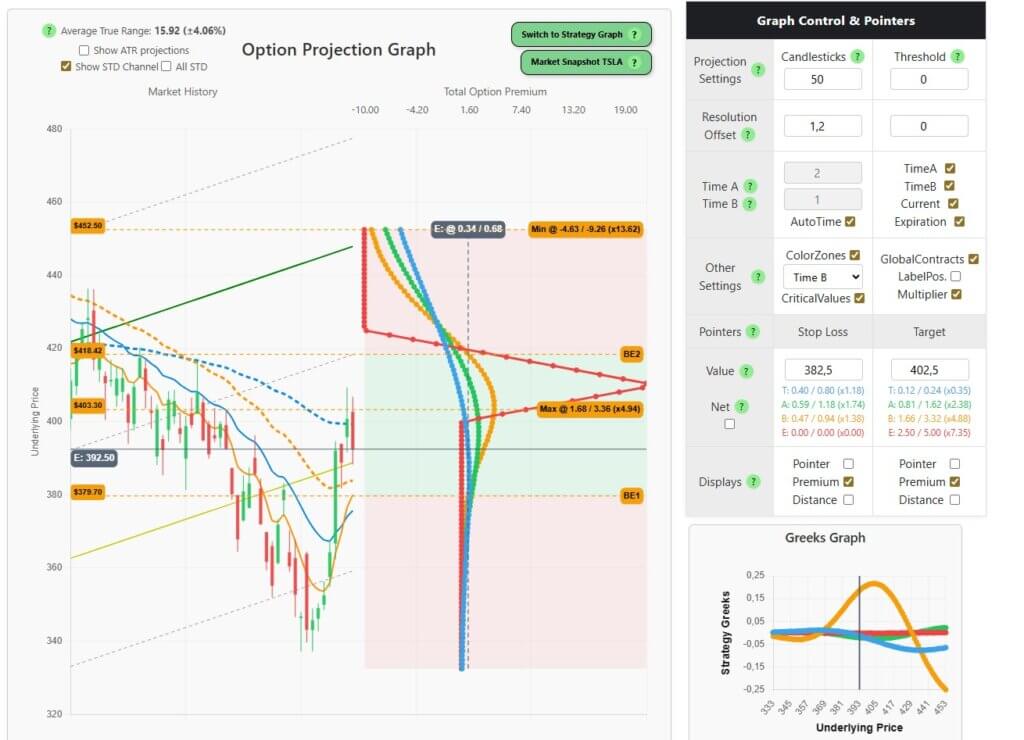
This allows you to see how your strategy evolves alongside real market movements, giving you a much clearer view of risk, timing, and potential outcomes. Instead of analyzing the strategy in isolation, you can see it in real market context!
The Trading Journal Module
With the Trading Journal it is possible to save, store, track and check any of the option strategies created in the option calculator of the previous module. By adding a ticker and a strategy name, we can save the strategy with a single click.
The Trading Journal will also track all the trading history that we have been saving, creating a summary of the P/L, the trades, the commissions… among many other things. It also supports multicurrency trades in case you work with a different currency in some of the trades!
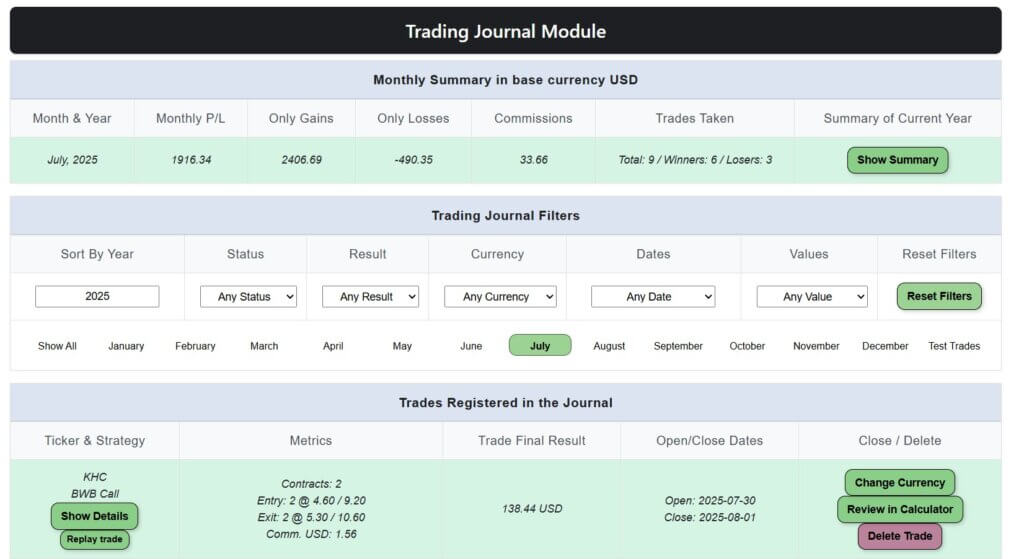
The Trading Journal module will show you the trades open, closed and their status
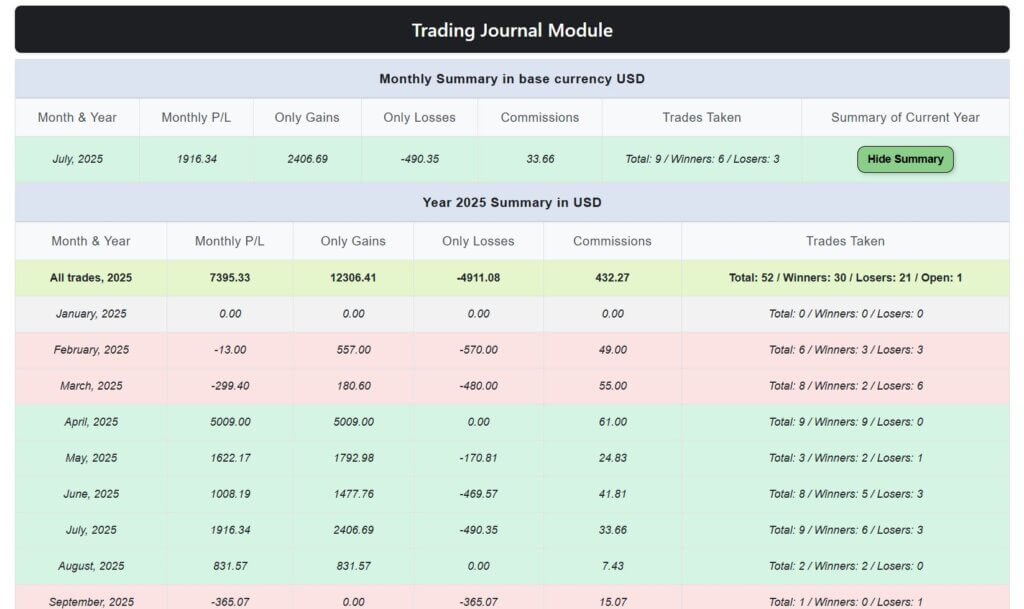
And also, it will display a summary of the year and for every single month
Oh, and if you want to consult, close a trade, check details or even replay a strategy, it is also possible by just clicking on a single button too!
The Strategy Comparator Module
Have you ever wanted to compare two option strategies hand by hand and check which behaves better under certain conditions? With the Strategy Comparator module this is absolutely possible!
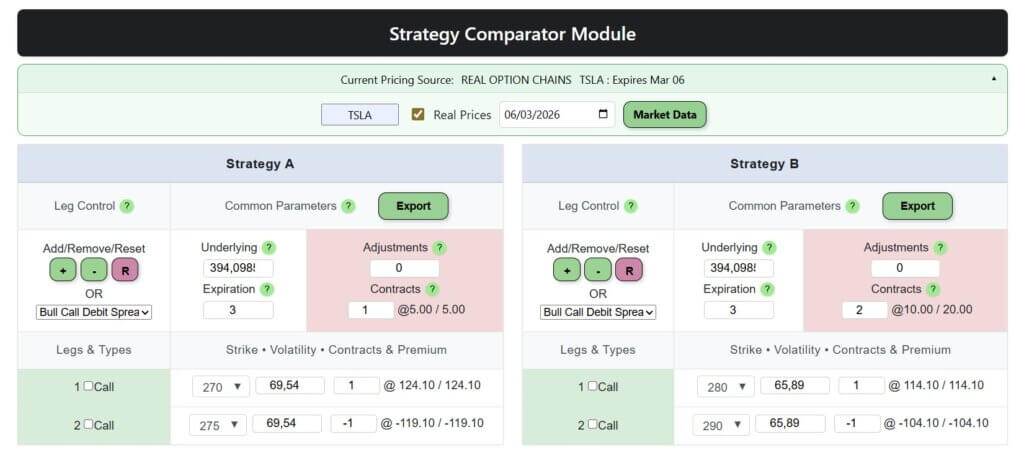
The Strategy Comparator for Call Debit Spread with different strikes
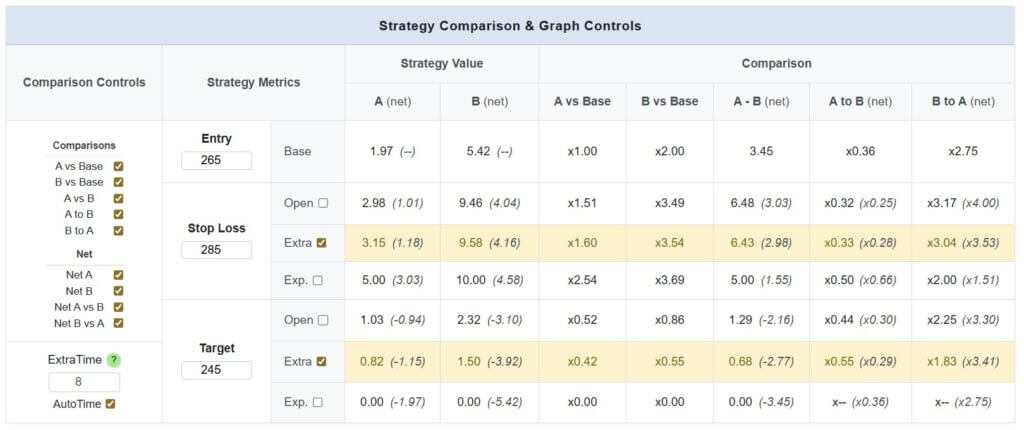
The performance of each strategy with real metrics
We can create two strategies and compare their metrics visually and mathematically using either theoretical or real market data so we can learn which is the most suitable for the situation we want.
Warsoption’s Toolsuite Available Plans
One plan. One price. Everything included now and in the future.
- Access to the Advanced Calculator Module
- Design, analyze and create simple options strategies
- Access to the Strategy Graph, pointers and graph customizations
- Close trades with up to 4 methods of exit
- Free advices, tips and tricks to use the Toolsuite to its maximum potential
- Everything included in the Basic Plan plus…
- Pick and create complex strategies up to 12 legs
- Adjust strategies by adding or closing legs
- Use APIs to retrieve option chain information for a real ticker
- Store your trades in the Journal, follow your P/L with the summaries
- Use a multicurrency account and change currency in trades
- Access to the Strategy Comparator and its tools
- Priority support
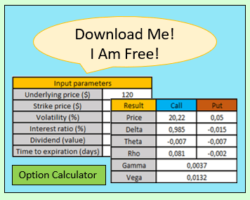
Get our Free Option Calculator with Warsoption Toolsuites

Design from scratch, analyze details and create option strategies with the Advanced Calculator module
And you get a super-reduced price trial for all the features too!
Frequent Asked Questions
Is Warsoption Toolsuite free to use?
Yes, it is free to use. You can create one-leg strategies in the option calculator, analyze them in both the P/L graph and the Greek graph, and close them using any method you wish in the Advanced Calculator module.
However, for opening strategies with two or more legs, using APIs to fetch market data, managing a multicurrency account, and accessing both the Trading Journal and the Strategy Comparator, you will need to upgrade your account in the settings area.
How can I upgrade my account?
Simply log in and access your account settings here.
The Basic Plan is active by default and is 100% free. To upgrade, choose the Trader Plan and select either monthly or yearly billing.
If this is your first time with us, you will be eligible for a $10 trial for 7 days. After the trial ends, your subscription will continue automatically at the full Trader Plan price based on the period you selected.
Once the payment is completed, you will immediately unlock all premium features and modules.
How does your subscription work?
We offer a single paid plan called the Trader Plan, available monthly or yearly, which grants access to every premium feature.
Our philosophy is simple: One plan. One price. Everything included.
There are no hidden fees and no future price increases when new features are added.
Monthly subscription: $79 per month. Billing starts the day you upgrade and renews every month unless you cancel.
Yearly subscription: $750 per year, equivalent to $62.5/month. Billing starts the day you upgrade and renews every year unless you cancel.
If you cancel, you will still keep access until the end of the paid billing period. On the last day of your subscription, we will send you an email with all your Trading Journal data.
I want to try all features, is there a reduced-price offer?
Yes. New accounts can enjoy a 7-day trial for only $10.
After the trial period, your account will automatically continue with the monthly or yearly subscription you selected unless you cancel before the trial ends.
For example, if you start your trial on 1/20 and cancel before 1/27, your trial will end on that date and you will not be charged the full subscription.
How can I cancel my subscription?
To cancel, log in and go to your account settings, then click Cancel my subscription.
You can cancel at any time without extra charges. After cancelling, you will still have access to all premium features until the end of your paid billing period.
What happens with my data if I cancel my subscription?
When your paid subscription ends, we will send you an email containing all the data from your Trading Journal trades so you do not lose your records if you decide to return later.
Do you offer refunds?
No. Due to the nature of this digital product, refunds are not offered.
However, if you want to try all premium features first, we recommend starting with the $10 reduced-price trial.
Are there guides to use the product?
Yes. You can find full documentation for every module here:
Are there any videos?
Yes. We also provide video explanations so you can see how the platform works in practice.
Can I use this product on my phone?
We do not guarantee full compatibility with mobile devices.
The Option Calculator has been designed primarily for desktop environments, where screen space and processing power provide a smoother and more accurate experience.
Some elements such as complex tables, graphs, or drag-and-drop tools may not display or behave as intended on mobile browsers.
I have found an issue, what should I do?
If you encounter a problem, please contact us through the Contact Us page once you are logged in. That is the fastest way to reach us.
I have some more questions or ideas about your product
We would love to hear them.
Please send your feedback through the Contact Us page.
Get our Free Option Calculator with Warsoption Toolsuites
Design from scratch, analyze details and create option strategies with the Advanced Calculator module
And you get a super-reduced price trial for all the features too!
The most recent content of our blog

The Complete Glossary of Options Trading Terms You Need to Know
Options trading can seem pretty overwhelming at first (that feeling…
Strategies for Stock Options – A Comprehensive Guide to Boost Your Investments
Stock options strategies are essential for maximizing profits and managing…
What is Stock Trading Volume: Understanding the Basics in the US
Understanding Stock Trading Volume is vital in the world of…
Beginner’s Guide: How to Invest in the Stock Market
Investing in the stock market can be a rewarding way…
Understanding Financial Options: What Are Financial Options and How Do They Work?
Financial options are derivative instruments that allow individuals to buy…

Heikin Ashi Candlestick: Unveiling the Trend in the US Market
Heikin Ashi candles, widely used by traders, are a popular…

Bull Put Spread vs Bull Call Spread: Understanding the Differences for Successful Options Trading
When it comes to options trading, investors can utilize different…

Pros and Cons of Options Trading: What You Need to Know Before Investing
Options trading can be a complex and risky investment strategy…